If you’ve ever found yourself digging through product manuals, company wikis, or lengthy documents just to find a simple answer, you know the pain. The fact you’re reading this suggests you’re interested in how Generative AI can make that process less painful. Stick around for a few minutes, and I’ll walk you through how we built a smarter FAQ bot using Google’s Gemini API, Retrieval Augmented Generation (RAG), and structured output. This isn’t just another chatbot; it’s designed to give reliable, context-aware answers based only on provided information, minimizing the risk of making things up (hallucination). This example uses Google Car manuals, but the principles apply anywhere you have a set of documents you need to query effectively. I’m sharing my journey building this; it’s a practical demonstration, not a definitive guide, so adapt the ideas to your needs!
Traditional search methods or basic chatbots often fall short when dealing with specific document sets:
Information Overload: Manually searching large documents is time-consuming and inefficient.
Generic LLM Limitations: Large Language Models (LLMs) are powerful, but they lack specific, up-to-date knowledge about your documents unless explicitly trained on them (which is often impractical).
Hallucination Risk: When asked about information outside their training data, LLMs might confidently invent answers that sound plausible but are incorrect. This is unacceptable for reliable FAQ systems.
Inconsistent Outputs: Getting answers in a usable, predictable format can be challenging with free-form text generation.
We need a system that answers questions accurately based only on a given set of documents and provides answers in a consistent, structured way.
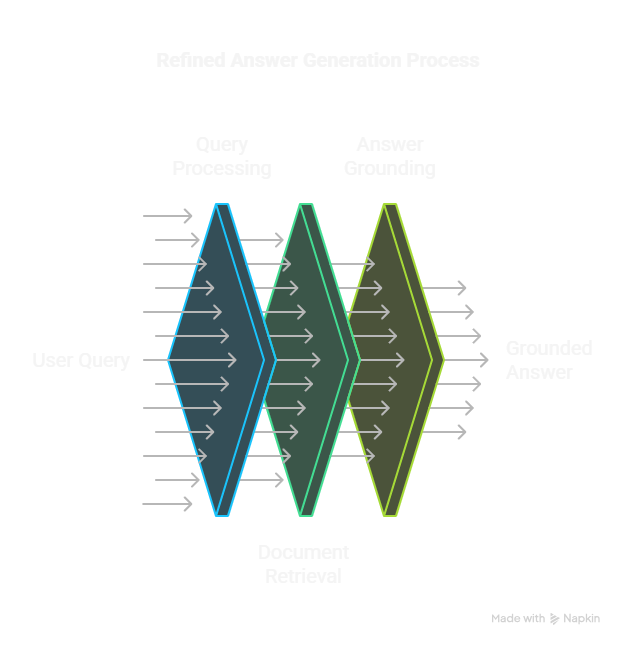
Our approach combines Retrieval Augmented Generation (RAG) with the capabilities of the Gemini API. At a high level, the user interacts with the system like this:
Figure 1: High-Level RAG Interaction Flow.
This involves three main steps in the underlying RAG pipeline:
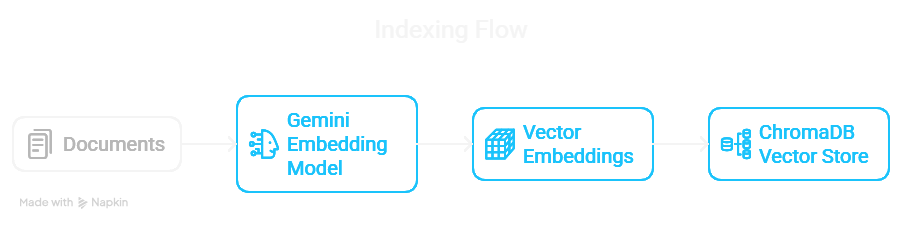
1. Indexing: Convert the source documents (Google Car manuals) into numerical representations (embeddings) using the Gemini text-embedding-004 model and store them in a vector database (ChromaDB). This allows for efficient similarity searches. This setup process is crucial for enabling fast retrieval later.
Figure 2: The Document Indexing Flow.
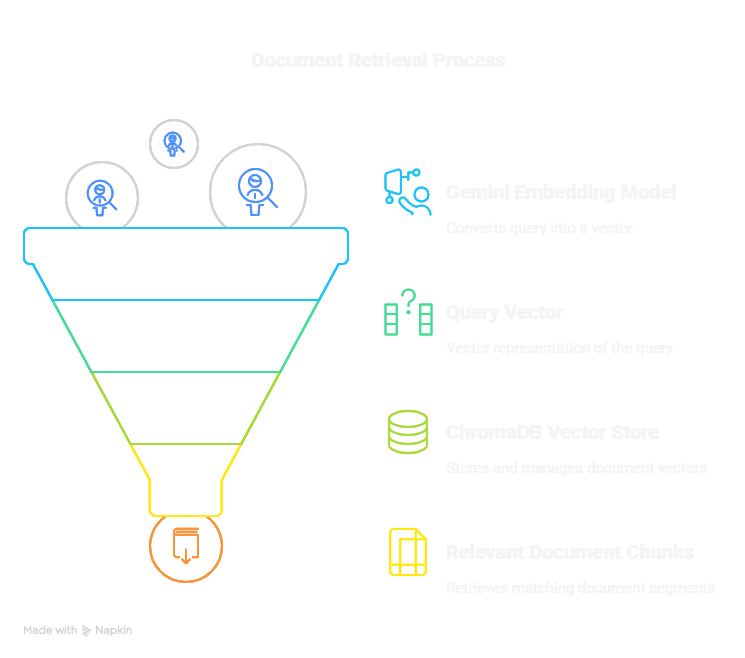
2. Retrieval: When a user asks a question, embed the question using the same model and search the vector database to find the most relevant document chunks based on semantic similarity.
Figure 3: The Query Retrieval Flow.
3. Generation: Pass the original question and the retrieved document chunks as context to a powerful LLM (like gemini-2.0-flash). Instruct the model to answer the question based only on the provided context.
Alongside the RAG structure, we leverage specific Gemini API Features:
High-Quality Embeddings:text-embedding-004 provides embeddings suitable for finding semantically similar text.
Powerful Generation:gemini-2.0-flash can synthesize answers based on the retrieved context.
Structured Output (JSON Mode): We instruct Gemini to return the answer and a confidence score in a predictable JSON format, making it easy for applications to use the output.
Optional Grounding: We can even add Google Search as a tool if the local documents don’t suffice (though our primary goal here is document-based Q&A).
We need to tell ChromaDB how to generate embeddings using the Gemini API.
# --- 4. Define Gemini Embedding Function for ChromaDB ---from chromadb import Documents, EmbeddingFunction, Embeddings
from google.api_core import retry
from google import genai
from google.genai import types
is_retriable =lambda e: (isinstance(e, genai.errors.APIError) and e.code in {429, 503})
classGeminiEmbeddingFunction(EmbeddingFunction):
document_mode =True# Toggle between indexing docs and embedding queries@retry.Retry(predicate=is_retriable)
def__call__(self, input_texts: Documents) -> Embeddings:
task ="retrieval_document"if self.document_mode else"retrieval_query" print(f"Embedding {'documents'if self.document_mode else'query'} ({len(input_texts)})...")
try:
# Assuming 'client' is initialized Google GenAI client response = client.models.embed_content(
model="models/text-embedding-004",
contents=input_texts,
config=types.EmbedContentConfig(task_type=task),
)
return [e.values for e in response.embeddings]
exceptExceptionas e:
print(f"Error during embedding: {e}")
return [[] for _ in input_texts]
2. Setting up ChromaDB and Indexing:
We create a ChromaDB collection and add our documents. get_or_create_collection makes this idempotent.
# --- 5. Setup ChromaDB Vector Store ---import chromadb
import time
print("Setting up ChromaDB...")
DB_NAME ="googlecar_faq_db"embed_fn = GeminiEmbeddingFunction()
chroma_client = chromadb.Client() # In-memory clienttry:
db = chroma_client.get_or_create_collection(name=DB_NAME, embedding_function=embed_fn)
print(f"Collection '{DB_NAME}' ready. Current count: {db.count()}")
# Assuming 'documents' and 'doc_ids' are defined earlierif db.count() < len(documents):
print(f"Adding/Updating documents in '{DB_NAME}'...")
embed_fn.document_mode =True# Set mode for indexing db.upsert(documents=documents, ids=doc_ids) # Use upsert for safety time.sleep(2) # Allow indexing to settle print(f"Documents added/updated. New count: {db.count()}")
else:
print("Documents already seem to be indexed.")
exceptExceptionas e:
print(f"Error setting up ChromaDB collection: {e}")
raiseSystemExit("ChromaDB setup failed. Exiting.")
3. Retrieving Relevant Documents:
This function takes the user query, embeds it (using document_mode=False), and searches ChromaDB.
# --- 6. Define Retrieval Function ---defretrieve_documents(query: str, n_results: int =1) -> list[str]:
print(f"\nRetrieving documents for query: '{query}'")
embed_fn.document_mode =False# Switch to query modetry:
results = db.query(query_texts=[query], n_results=n_results)
if results and results.get("documents"):
retrieved_docs = results["documents"][0]
print(f"Retrieved {len(retrieved_docs)} documents.")
return retrieved_docs
else:
print("No documents retrieved.")
return []
exceptExceptionas e:
print(f"Error querying ChromaDB: {e}")
return []
4. Generating the Structured Answer:
Here’s the core logic combining the query, retrieved context, and instructions for the LLM, specifying JSON output with a confidence score.
# --- 7. Define Structured Output Schema ---from typing_extensions import Literal
from pydantic import BaseModel
classAnswerWithConfidence(BaseModel):
answer: str
confidence: Literal["High", "Medium", "Low"]
# --- 8. Define Augmented Generation Function ---defgenerate_structured_answer(query: str, context_docs: list[str]) -> dict |None:
ifnot context_docs:
print("No context provided, cannot generate answer.")
return {
"answer": "I couldn't find relevant information in the provided documents to answer this question.",
"confidence": "Low",
}
context ="\n---\n".join(context_docs)
prompt =f"""You are an AI assistant answering questions about a Google car based ONLY on the provided documents.
Context Documents:
---
{context}---
Question: {query}Based *only* on the information in the context documents above, answer the question.
Also, assess your confidence in the answer based *only* on the provided text:
- "High" if the answer is directly and clearly stated in the documents.
- "Medium" if the answer can be inferred but isn't explicitly stated.
- "Low" if the documents don't seem to contain the answer or are ambiguous.
Return your response ONLY as a JSON object with the keys "answer" and "confidence". Example format:
{{ "answer": "Your answer here.",
"confidence": "High/Medium/Low"
}}"""try:
generation_config = types.GenerateContentConfig(
temperature=0.2,
response_mime_type="application/json", # Request JSON response_schema=AnswerWithConfidence, # Provide the schema )
# Assuming 'client' is initialized Google GenAI client response = client.models.generate_content(
model="gemini-2.0-flash",
contents=prompt,
generation_config=generation_config, # Pass the config object )
# Safe access to parsed outputif (
response.candidates
and response.candidates[0].content
and response.candidates[0].content.parts
):
parsed_output = response.candidates[0].content.parts[0].function_call
# Fallback check if .parsed is usedifnot parsed_output and hasattr(
response.candidates[0].content.parts[0], "parsed" ):
parsed_output = response.candidates[0].content.parts[0].parsed
if isinstance(parsed_output, dict) and"answer"in parsed_output and"confidence"in parsed_output:
print("Generated Answer:", parsed_output)
return parsed_output
else:
print("Warning: Could not extract valid JSON from response.")
print("Raw response part:", response.candidates[0].content.parts[0])
# Attempt to parse the text part if it exists and looks like JSONtry:
import json
text_part = response.candidates[0].content.parts[0].text
if text_part and text_part.strip().startswith("{") and text_part.strip().endswith("}"):
parsed_json = json.loads(text_part)
if isinstance(parsed_json, dict) and"answer"in parsed_json and"confidence"in parsed_json:
print("Recovered JSON from text part:", parsed_json)
return parsed_json
exceptExceptionas json_e:
print(f"Could not parse text part as JSON: {json_e}")
print("Error: Could not generate/parse structured response correctly.")
return {"answer": "Error: Could not generate or parse the structured response from the AI.", "confidence": "Low"}
exceptExceptionas e:
print(f"Error during content generation call: {e}")
return {"answer": f"Error during generation API call: {e}", "confidence": "Low"}
Tip: Ensure your API key is correctly set up in Kaggle Secrets (GOOGLE_API_KEY). Also, ChromaDB setup might require specific permissions or setup depending on the environment (here we use an in-memory one for simplicity).
This implementation is a great starting point, but it has limitations:
Document Quality: The RAG system’s effectiveness heavily depends on the quality, relevance, and comprehensiveness of the indexed documents. Garbage in, garbage out.
Retrieval Accuracy: Simple similarity search might not always retrieve the perfect chunk of text, especially for complex queries. More advanced retrieval strategies (like hybrid search or re-ranking) could improve this.
Structured Output Failures: While JSON mode is robust, the LLM might occasionally fail to generate perfectly valid JSON matching the schema. More robust error handling and potentially retries could be added.
Limited Context Handling (within LLM): While RAG provides context, the LLM itself still has limits on how much context it can process effectively in a single generation step. Very long retrieved passages might need summarization or chunking before being sent to the LLM.
Static Knowledge: The bot only knows what’s in the ChromaDB index. It doesn’t learn automatically. Updates require re-indexing.
Building this FAQ bot demonstrates how combining RAG with Gemini’s embedding and generation capabilities, especially its structured output mode, can create powerful and reliable AI-driven Q&A systems. By grounding the LLM’s responses in specific source documents and requesting a confidence score, we significantly mitigate hallucination and provide a more trustworthy user experience.
Structured Output (JSON Mode) enhances reliability and integrability.
Confidence Scores add a layer of trustworthiness.
This approach is versatile and can be adapted for various knowledge bases, from customer support FAQs to internal documentation search.
I hope this walkthrough provides a clear picture of how this smarter FAQ bot works! Feel free to ask questions or leave a comment with your thoughts or own implementations!